Section Properties
Task 6 defined two problems, the first of which required the geometric properties of sections as per SP:6 (1)-1964.
It was suggested to use the sectionproperties package for the calculations. Let us do the following:
- Install
sectionpropertiespackage from PyPI. - Study the documentation to create an I-section and calculate its geometric properties.
- Try out the commands from Python REPL.
- Develop a class to perform the specified tasks.
- Develop a function to read data froma CSVV/Excel file and use the class to calculate geometric properties of sections listed therein.
- Develop a CLI application to use the function.
Install sectionproperties
Application Development
sectionproperties Documentation
Exploring the sectionproperties documentation showed that the steps to calculating geometric properties of a section require the following steps:
- Create a geometry.
- Create a mesh for the geometry.
- Create a section (
sectionproperties.analysis.Section) from the geometry. - Calculate geometric propertiesof the section.
- There is a pre-defined library of functions to create standard geometris and the one that is appropriate for steel cross sections as per SP:6 (1)-1964 are
tapered_flange_i_section()for I sections andtapered_flange-channelfor channel sections.
Try sectionproperties in Python REPL
Open Python REPL or (IPython REPL inside Spyder IDE), note down the size of ISMB 300 from SP:6 (1)-1964 and try the following:
>>> from sectionproperties.pre.library import tapered_flange_i_section
>>> from sectionproperties.analysis import Section
>>> geom = tapered_flange_i_section(d=300, b=140, t_f=12.4, t_w=7.5, r_r=14.0, r_f=7.0, alpha=8, n_r=16)
>>> geom.create_mesh(mesh_sizes=0)
<sectionproperties.pre.geometry.Geometry object at 0x000001E97ECEAF90>
>>> geom.plot_geometry()
>>> sec = Section(geometry=geom)
>>> sec.calculate_geometric_properties()
>>> sec.display_results()
     Section Properties
┏━━━━━━━━━━━┳━━━━━━━━━━━━━━┓
┃ Property  ┃        Value ┃
┡━━━━━━━━━━━╇━━━━━━━━━━━━━━┩
│ area      │ 5.626648e+03 │
│ perimeter │ 1.084520e+03 │
│ qx        │ 8.439972e+05 │
│ qy        │ 3.938654e+05 │
│ ixx_g     │ 2.126448e+08 │
│ iyy_g     │ 3.210956e+07 │
│ ixy_g     │ 5.907981e+07 │
│ cx        │ 7.000000e+01 │
│ cy        │ 1.500000e+02 │
│ ixx_c     │ 8.604526e+07 │
│ iyy_c     │ 4.538987e+06 │
│ ixy_c     │ 2.235174e-08 │
│ zxx+      │ 5.736351e+05 │
│ zxx-      │ 5.736351e+05 │
│ zyy+      │ 6.484268e+04 │
│ zyy-      │ 6.484268e+04 │
│ rx        │ 1.236627e+02 │
│ ry        │ 2.840237e+01 │
│ i11_c     │ 8.604526e+07 │
│ i22_c     │ 4.538987e+06 │
│ phi       │ 0.000000e+00 │
│ z11+      │ 5.736351e+05 │
│ z11-      │ 5.736351e+05 │
│ z22+      │ 6.484268e+04 │
│ z22-      │ 6.484268e+04 │
│ r11       │ 1.236627e+02 │
│ r22       │ 2.840237e+01 │
└───────────┴──────────────┘

>>> sec.get_area()
np.float64(5626.648100857684)
>>> sec.get_ic()
(np.float64(86045259.31526682), np.float64(4538987.412026007), np.float64(2.2351741790771484e-08))
>>> sec.get_z()
(np.float64(573635.0621017787), np.float64(573635.0621017789), np.float64(64842.67731465717), np.float64(64842.6773146573))
>>> sec.get_rc()
(np.float64(123.66266358883864), np.float64(28.40237203783421))
Warning
Slope of Flange D for ISMB 300 in SP:6 (1)-1964 is 98 degrees (measured with reference to the vertical direction). alpha of tapered_flage_i_section() is 8 degrees (measured with respect to horizontal direction)
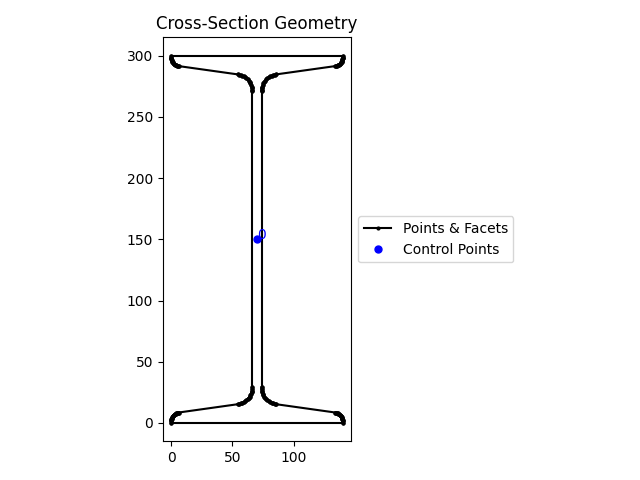
The area of cross section as per SP:6 (1)-1964 is \(56.26 \text{cm}^2\) whereas the area as calculated by sectionproperties is \(5626.648100857684 \text{mm}^2 = 56.27 \text{cm}^2\), an error 0f \(0.01 \text{cm}^2\) with respect to the value in SP:6 (1)-1964.
Class and Application
Now that we know how sectionproperties is to be used to calculate geometric properties, let us create a class to store the properties of an I section and provide methods to perform the required tasks. Let us use dataclasses.dataclass to simplify the creation of the class.
Note
When the number of attributes is large and defining a long list of parameters in a function becomes tedious, it is best to use a class with the attributes as the data fields of the class. This way, they are input once and all the methods of the class have direct access to the attributes without having to pass them as arguments.
Name of class: class ISection
Object initialisation parameters:
- Depth of the tapered flange I section
d- \(h\) in SP:6 (1)-1964 - Width of the tapered flange I section
b- \(b\) in SP:6 (1)-1964 - Mid-flange thickness of the tapered flange I section (measured at the point equidistant from the face of the web to the edge of the flange)
t_f- \(t_f\) in SP:6 (1)-1964 - Web thickness of the tapered flange I section
t_w- \(t_w\) in SP:6 (1)-1964 - Root radius of the tapered flange I section
r_r- \(r_1\) in SP:6 (1)-1964 - Flange radius of the tapered flange I section
r_f- \(r_2\) in SP:6 (1)-1964 - Flange angle of the tapered flange I section in degrees
alpha- Slope of flange \(D - 90\) degrees in SP:6 (1)-1964 - Number of points discretising the radii
n_rto be chosen by the user
Methods:
- Plot geometry
plot_geometry() - Display geometric properties
display_geometric_properties()
Properties
- Area
area - Second moment of area about centroidal axes
Ixx,Iyy - Section modulus about centroidal axes
Zxx,Zyy - Radius of gyration about centroidal axes
rxx,ryy
The output is very close or identical to the values in SP:6 (1)-1964 and is shown below:
A = 56.27 cm^2
Ixx = 8604.3 cm^4
Iyy = 453.9 cm^4
Zxx = 573.6 cm^3
Zyy = 64.8 cm^3
rxx = 12.37 cm
ryy = 2.84 cm
Note
- The
dataclassautomatically generates the__init__()magc method based on the fields listed. In adataclassdefinition, specifying the datatype of the fields is required, not optional. Thedtaclassgenerates other magic methods such as__str__(), comparison operators__eq__()etc. - The magic method
__post_init__(self)is invoked automatically immediately after the object is initialized and gives an opportunity to the prorgammer to do post initialization steps if any. This method is necessary because to customize the initialization step. - In this example, the
__post_init__()magic method automatically creates the geometry and the section using the fields in the initialized object. This would not be done by the__init__()method generated bydataclassand we would have to write a method to implement this step and remember to call it before requesting for geometric properties. - The
@propertydecorator available through thedataclassallows us to write a getter, that is, a way to get a value from inside the object. Not having to write a getter function with the trailing parentheses()makes the method appear like a property.
Processing a set of sections
Now that the class is working as expected for one section, it is time to think of reading section dimensions of a set of sections and process them one at a time using the class created previously. Following i sthe data taken from SP:6(1)-1964 for three different I sections, which can be created using a text editor or using Excel (but remembering to "Save as"" to CSV format):
| isections.csv | |
|---|---|
Note
- Line 1 is the header and contains the names of the columns. If a column name contains one or more spaces, it is best to enclose the name within double quotes
". - Column names are as per the nomenclature in SP:6 (1)-1964.
- On each row, the first column is the section designation and is enclosed within double quotes as it contains a space. The other columns are all numbers and must not be enclosed in double quotes. Columns are separated by a comma
,.
Let us read the data from this file and display it in the Python REPL (or Spyder IDE Ipython console):
>>> import pandas as pd
>>> df = pd.read_csv("isections.csv")
>>> df.head()
  designation    h    b    tf   tw    r1   r2   D
0    ISLB 300  300  150   9.4  6.7  15.0  7.5  98
1    ISMB 300  300  140  12.4  7.5  14.0  7.0  98
2    ISMB 450  450  150  17.4  9.4  15.0  7.5  98
>>> df.dtypes
designation        str
h                int64
b                int64
tf             float64
tw             float64
r1             float64
r2             float64
D                int64
dtype: object
>>> for idx, row in df.iterrows():
...     print(row['h'], row['b'], row['tf'], row['tw'], row['r1'], row['r2'], row['D'])
...
300 150 9.4 6.7 15.0 7.5 98
300 140 12.4 7.5 14.0 7.0 98
450 150 17.4 9.4 15.0 7.5 98
>>> for idx, row in df.iterrows():
...     print(row.to_dict())
...
{'designation': 'ISLB 300', 'h': 300, 'b': 150, 'tf': 9.4, 'tw': 6.7, 'r1': 15.0, 'r2': 7.5, 'D': 98}
{'designation': 'ISMB 300', 'h': 300, 'b': 140, 'tf': 12.4, 'tw': 7.5, 'r1': 14.0, 'r2': 7.0, 'D': 98}
{'designation': 'ISMB 450', 'h': 450, 'b': 150, 'tf': 17.4, 'tw': 9.4, 'r1': 15.0, 'r2': 7.5, 'D': 98}
- For each row,
df.iterrows()returns atuplewith two objects:- the first is the row index which we store in
idx - the sectiond is the row returned in a
pandas.Seriesobject
- the first is the row index which we store in
row.to_dict()converts thepandas.Seriesobject into a dictionary with the column names as the keys.
We must change the names of the columns of the DataFrame to match the input arguments to tapered_flange_i_section(). Further, the input argument alpha is obtained by subtracting 90 degrees from the values in column D. Subsequently the column D can be deleted as it is no longer required.
>>> df = df.rename(columns={"h": "d", "tf": "t_f", "tw": "t_w", "r1": "r_r", "r2": "r_f"})
>>> df
  designation    d    b   t_f  t_w   r_r  r_f   D
0    ISLB 300  300  150   9.4  6.7  15.0  7.5  98
1    ISMB 300  300  140  12.4  7.5  14.0  7.0  98
2    ISMB 450  450  150  17.4  9.4  15.0  7.5  98
>>> df["alpha"] = df["D"] - 90
>>> df.head()
  designation    d    b   t_f  t_w   r_r  r_f   D  alpha
0    ISLB 300  300  150   9.4  6.7  15.0  7.5  98      8
1    ISMB 300  300  140  12.4  7.5  14.0  7.0  98      8
2    ISMB 450  450  150  17.4  9.4  15.0  7.5  98      8
>>> df = df.drop(columns=["D"])
>>> df.head()
  designation    d    b   t_f  t_w   r_r  r_f  alpha
0    ISLB 300  300  150   9.4  6.7  15.0  7.5      8
1    ISMB 300  300  140  12.4  7.5  14.0  7.0      8
2    ISMB 450  450  150  17.4  9.4  15.0  7.5      8
>>> df.iloc[0, 1:8].to_dict()
{'d': 300, 'b': 150, 't_f': 9.4, 't_w': 6.7, 'r_r': 15.0, 'r_f': 7.5, 'alpha': 8}
>>> for idx, row in df.iterrows():
...     print(row.iloc[1:8].to_dict())
...
{'d': 300, 'b': 150, 't_f': 9.4, 't_w': 6.7, 'r_r': 15.0, 'r_f': 7.5, 'alpha': 8}
{'d': 300, 'b': 140, 't_f': 12.4, 't_w': 7.5, 'r_r': 14.0, 'r_f': 7.0, 'alpha': 8}
{'d': 450, 'b': 150, 't_f': 17.4, 't_w': 9.4, 'r_r': 15.0, 'r_f': 7.5, 'alpha': 8}
df.iloc[0, 1:8]select row index0and lets us index columns by numbers (first column is0) instead of by names. In this example, we are fetching row index0and column indices1to7(8not included as per slicing logic). This returns apandas.Series..to_dict()convrts thepandas.Seriesto adict.
Data is now ready to create a ISection object using the data from each row:
>>> sec = ISection(**df.iloc[0, 1:8].to_dict())
>>> sec.area
np.float64(4810.419826483751)
>>> for idx, row in df.iterrows():
...     sec = ISection(**row.iloc[1:8].to_dict())
...     print(row["designation"], sec.area)
...
ISLB 300 4810.419826483751
ISMB 300 5627.014726939055
ISMB 450 9227.361191639227
rowis an object of typepandas.Series.row.iloc[1:8]returns the columns 1 to 7 as aSeries.row.iloc[1:8].to_dict()converts these seven columns of the row into adict.**row.iloc[1:8].to_dict()unpacks thedictinto individual keyword arguments ready to be used in creating an object of typeISection.
Cross checking the areas of the sections shows us that things are working as expected. Let us write the following functions:
clean_data(df: pd.DataFrame) -> pd.dataFramethat takes a DataFrame as its input and carries out the following operations:- Renames the columns,
- Calculates the column
alpha, - Drops the column
Dthat is no longer required, and - Returns the cleaned DataFrame.
main()that takes the filename from which to read data, cleans the data usinclean_data()and processes each line one at a time usingISection.
clean_data() and main() Functions
We are now ready to write the clean_data() and main() functions:
Run the application from the command line:
This should produce the output:
CLI Application
To convert this application to a CLI application, change the line main("isections.csv") to #py typer.run(main) and we are ready to go.
Now test to verify that the CLI application displays help with the following command:
This should display the following output:
 Usage: secprop_app.py [OPTIONS] FILENAME

╭─ Arguments ────────────────────────────────────────────────────────────────────────────────────────────╮
│ *    filename      TEXT  [required]                                                                    │
╰────────────────────────────────────────────────────────────────────────────────────────────────────────╯
╭─ Options ──────────────────────────────────────────────────────────────────────────────────────────────╮
│ --help                Show this message and exit.                                                      │
╰────────────────────────────────────────────────────────────────────────────────────────────────────────╯
Try the CLI application with the following commands:
Note: This command must display the results on the screen.
Remaining Tasks
Following changes can be made to the application:
- Check that the input file exists before attempting to read it. Raise
FileNotFoundErrorexception if not found. Usepathlib.Pathfor this purpose. - If the file exists, check the filename suffix and depending on whether it is
.csvor.xlsxor.xls, read the file withpandas.read_csv()orpandas.read_excel(). - Create additional columns in the DataFrame for the geometric properties and populate the rows with the calculated values, after converting to the same units as in SP:6(1)-1964.
- Modify the
main()function to take a second optional parameteroutputand when provided, take it to be the name of the file to which the section dimensions along with the calculated properties are to be written. If this parameter is not given, display the results to the screen. - Check if the output filename exists and raise
FileExistsErrorexception and do not overwrite the existing file. If it does not exist, usepandas.to_csv()orpandas.to_excel()depending on the output filename suffix, to save the data to a file.
Finished CLI Application
Here is the full CLI application for your refernce:
You can use the CLI application as follows:
The output of the first command must be as follows:
> uv run -- python secprop_app.py isections.csv
  designation    d    b   t_f  t_w   r_r  r_f  alpha  n_r  area  Ixx  Iyy  Zxx  Zyy  rxx  ryy
0    ISLB 300  300  150   9.4  6.7  15.0  7.5      8   32   0.0  0.0  0.0  0.0  0.0  0.0  0.0
1    ISMB 300  300  140  12.4  7.5  14.0  7.0      8   32   0.0  0.0  0.0  0.0  0.0  0.0  0.0
2    ISMB 450  450  150  17.4  9.4  15.0  7.5      8   32   0.0  0.0  0.0  0.0  0.0  0.0  0.0

Section Geometric Properties
============================
  designation       Ixx     Iyy      Zxx     Zyy    rxx   ryy
0    ISLB 300   7339.16  377.26   482.35   50.30  12.35  2.80
1    ISMB 300   8605.09  453.85   573.67   64.84  12.37  2.84
2    ISMB 450  30393.89  833.92  1350.84  111.19  18.15  3.01
The second command produces the following output on the screen:
> uv run -- python secprop_app.py isections.csv --output isections_geomprop.csv
  designation    d    b   t_f  t_w   r_r  r_f  alpha  n_r  area  Ixx  Iyy  Zxx  Zyy  rxx  ryy
0    ISLB 300  300  150   9.4  6.7  15.0  7.5      8   32   0.0  0.0  0.0  0.0  0.0  0.0  0.0
1    ISMB 300  300  140  12.4  7.5  14.0  7.0      8   32   0.0  0.0  0.0  0.0  0.0  0.0  0.0
2    ISMB 450  450  150  17.4  9.4  15.0  7.5      8   32   0.0  0.0  0.0  0.0  0.0  0.0  0.0

Saving data to isections_geomprop.csv
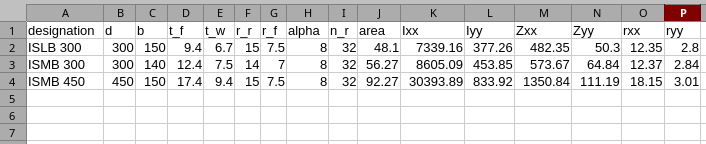
The contents of the output file must be as follows:
"designation","d","b","t_f","t_w","r_r","r_f","alpha","n_r","area","Ixx","Iyy","Zxx","Zyy","rxx","ryy"
"ISLB 300",300,150,9.4,6.7,15.0,7.5,8,32,48.1,7339.16,377.26,482.35,50.3,12.35,2.8
"ISMB 300",300,140,12.4,7.5,14.0,7.0,8,32,56.27,8605.09,453.85,573.67,64.84,12.37,2.84
"ISMB 450",450,150,17.4,9.4,15.0,7.5,8,32,92.27,30393.89,833.92,1350.84,111.19,18.15,3.01